
👀 See your current plan
- Log in to your Montu account.
- Click Settings ("Configuración") (bottom left corner of the panel).
- Then select My Plan ("Mi Plan").
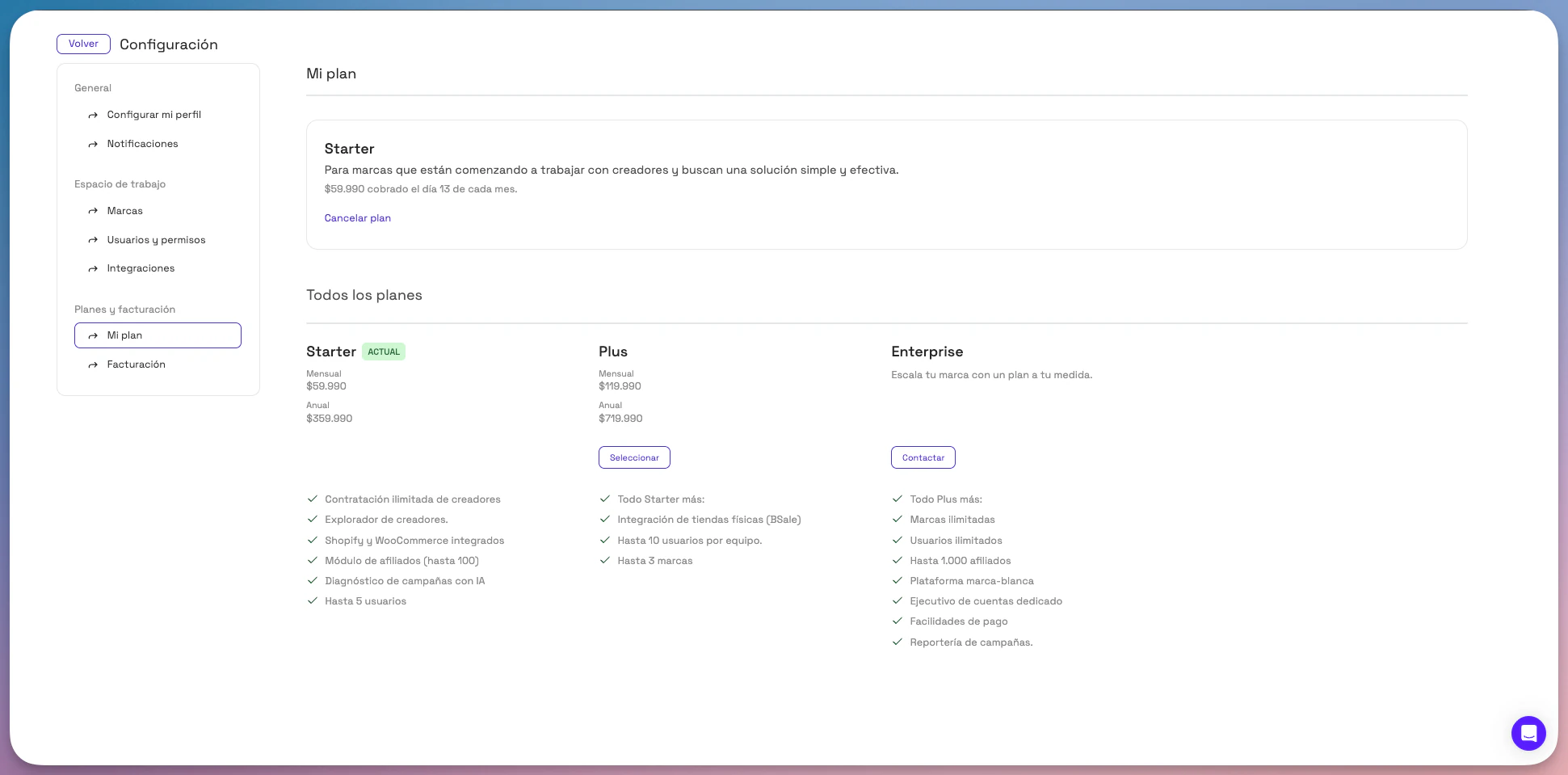
📍 At the top of that section you'll see:
- The name of your current plan.
- The monthly or annual price.
- The scheduled billing date.
🔁 Change your plan
In the same section, you'll see the available plans at the bottom of the page.
- Review the features and prices of each one.
- Click Select ("Seleccionar") to sign up for a Starter or Plus plan, or Contact ("Contactar") to book a call and explore options for an Enterprise plan.
- The new plan is activated immediately, and the system automatically prorates the price if applicable.
💡 Important: If you have any questions about the billing process or the prorated amount when changing plans, see the related article on Billing and Payment Methods.
❌ Cancel your subscription
If you want to stop using Montu, you can cancel your plan at any time:
- Click the Cancel plan ("Cancelar plan") button in the My Plan section.
- Follow the steps to confirm the cancellation.
🟡 Note: "When you cancel your plan, you keep access until the end of the period you've already paid for."